PDF Accessibility and Remediation Services
A scanned page is a picture, and people who use screen readers can't use it until it has been prepared. Our Accessibility On Demand service takes the scanned documents and PDFs you already have and makes them usable with screen readers and other assistive technology. Because it sits alongside our scanning work, records can be scanned and made accessible in the same project.
- Automated processing in minutes
- Scanning and accessibility in one project
- Since 1984

Who this is for
If people outside your organization read or use your documents, this is for you.
Public agencies and schools
Cities, counties, school systems and other public bodies that post forms, notices and records for the people they serve.
Organizations with public documents
Companies and nonprofits that publish PDFs on a website or share them with customers, members or applicants.
Teams with a scanned backlog
Records and clerk's offices with archives of scanned pages that were never prepared for screen readers.
Why accessible documents are coming up now
Scanned records are easy to store and search, but a scan is a picture of a page. People who use screen readers can't use it until it has been prepared for them.
Public entities have dates to meet
The ADA Title II rule requires state and local governments, including public schools and universities, to meet WCAG 2.1 Level AA for their web content, and that includes PDFs.
April 26, 2027 for entities serving 50,000 people or more.
April 26, 2028 for smaller entities and special districts.
A scan on its own can't be read aloud
Making a document accessible takes tags, a reading order, descriptions for images and charts, and usable forms. Done by hand across a large backlog, that is slow work, which is why many organizations put it off.
Some documents are exempt, many are not
The rule has narrow exceptions, including older documents posted before your compliance date that people don't use to apply for or get services. New documents, and any document people rely on to use a service, generally need to be accessible.
Dates are from the Justice Department's April 2026 rule. This is general information, not legal advice. Your counsel can tell you what applies to your organization. For a practical starting point, read Where to start with accessible PDFs when you have a records backlog.
What remediation includes
Remediation means preparing a document so people who use screen readers can move through it the way anyone else would. Depending on the document, the work includes:
- Tags and a logical reading order, so a screen reader moves through each page the way a person would
- Text descriptions for images and charts
- Bookmarks and document properties that make long files easier to navigate
- Forms prepared so they can be completed with a keyboard and a screen reader
- A person reviews and corrects the result for documents that carry more risk, such as legally required notices and complex forms
Three steps from scanned page to accessible PDF
Send your documents
Upload or send individual files or whole batches, whether they are scanned pages or PDFs your staff created.
Choose how much review each one needs
Match the level of review to the document. Notices and forms people depend on get a closer look than a simple archive.
Get accessible PDFs back
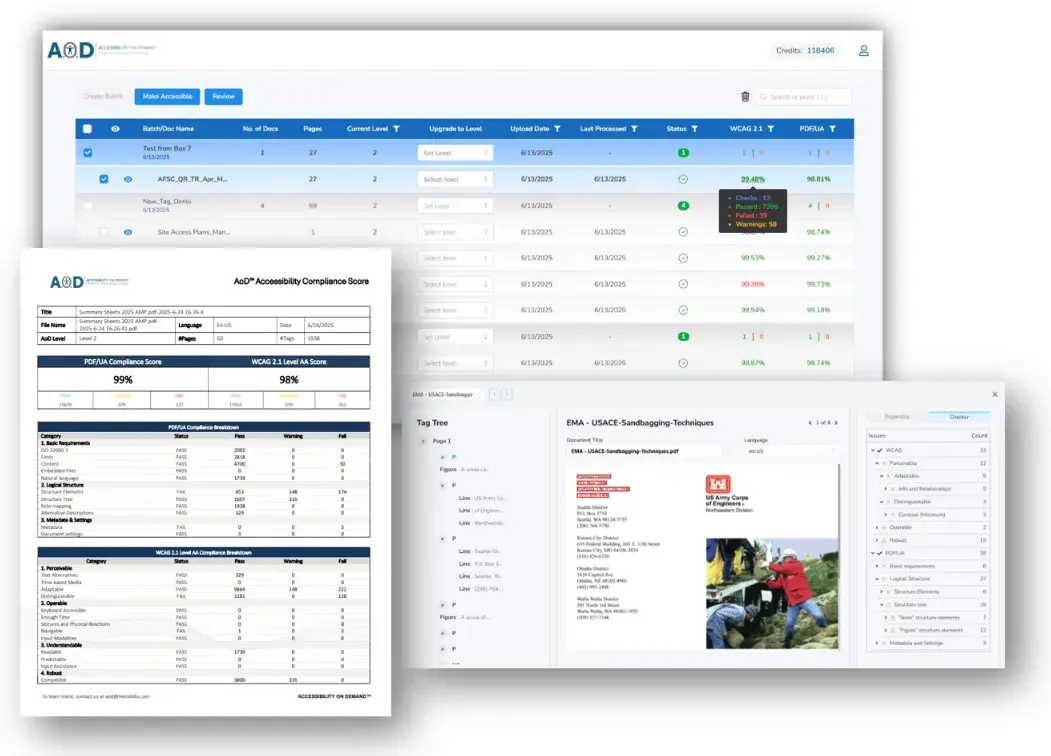
Each finished file has a reading order, tags, image descriptions and bookmarks, ready to post or file. Documents processed automatically are typically done within minutes. Documents that get a person's review take longer.
Which documents we handle
Bring us scanned pages, PDFs your staff created, or paper that still needs to be scanned. We scan it and prepare it in the same project.
- Scanned records and archives, including paper that has not been scanned yet
- Existing PDFs on your website or in your portals
- Forms people need to fill in
- Long reports, plans and multi-page files
How review works
A simple internal archive and a legally required public notice don't need the same level of attention, so you choose how much review each kind of document gets. For documents that carry more risk, such as legally required notices and complex forms, a person reviews and corrects the result.
What you receive
You choose how you want to work. Either way, you end up with accessible PDFs ready to post or file.
- If we run it: send us your documents and we return remediated, accessible PDFs
- If you run it: get access to the remediation platform, then upload your documents and download the results yourself
- Every finished PDF has tags and a reading order, text descriptions for images and charts, and bookmarks for long files
How projects are scoped
We start with a conversation about your documents and how they are used. Three things shape the plan.
What you have
How many documents there are and what kind they are: scanned pages, existing PDFs, forms or long reports.
Whether paper comes first
If records are still on paper, they are scanned first and then prepared.
How you want to work
Have us run the remediation for you, or get access to do it yourself.
Questions about PDF accessibility
Can you make our scanned and existing PDFs accessible?
Yes. Our Accessibility On Demand service prepares scanned and existing PDFs for screen readers by adding tags, a reading order, image descriptions and bookmarks. How much review a document needs depends on how it is used and what you have to meet, so we talk through your documents first.
How long does it take?
Documents processed automatically are typically done within minutes of submission, and larger groups of files can take a little longer. Documents that get a person's review take longer, so the timing depends on how much review you choose.
Can we do it ourselves, or do you do it for us?
Either. You can have us run the remediation and send back remediated PDFs, or you can get access to the platform and upload and download your own documents.
Is a scanned PDF accessible?
Not on its own. A scan is a picture of a page. It needs recognized text, tags, a reading order and, where relevant, image descriptions before a screen reader can use it.
What is PDF remediation?
It is the work of preparing a PDF so assistive technology can read it. That means adding tags and a logical reading order, text descriptions for images and charts, bookmarks for long files, and forms that work with a keyboard.
What does WCAG 2.1 Level AA mean?
WCAG is the Web Content Accessibility Guidelines, published by the W3C. Version 2.1 is the technical standard the ADA Title II rule points to, and Level AA is the level it requires. In plain terms, it is a checklist of what makes content usable for people with disabilities, such as text descriptions for images and a logical reading order.
Can you scan paper records and make them accessible in the same project?
Yes. We scan the records and prepare them for screen readers as one project, so you don't have to hand the files to a second team.
Which documents need to be accessible?
It depends on who you are and how the document is used. The ADA Title II rule covers state and local governments, and it has narrow exceptions for some older documents. Your counsel can tell you what applies to your organization.
How are accessibility projects priced?
Pricing depends on how many documents you have, what kind they are and how much review each one needs, so we scope it after we talk through your documents.
See what your documents need
Scanned records, PDFs on your website, forms or all three. Send us a few sample documents and we'll tell you what they need.